
Warehouse Connector Help Return to Warehouse Connector App
GitHub
  • Warehouse Connector Overview
  • Manage Sales Orders
  • Manage Purchase Order
  • Manage Products
  • Manage Customers
  • Configure General Settings
  • Shopify Store Integration
    • How do I create a Private App in Shopify?
    • How do I connect my Shopify store?
    • How do I sync order data with the Shopify store?
    • How do I sync product data with the Shopify store?
    • How do I sync inventory, customer, and fulfillment data with the Shopify store?
    • How do I perform custom field mapping with the Shopify store?
    • How do I perform warehouse mapping with the Shopify store?
    • How do I perform product mapping with the Shopify store?
  • Amazon Store Integration
  • NetSuite Integration
  • MasonHub Integration
  • GLO/NAV Integration
  • Impress Integration

# How do I sync product data with the Shopify store?

Once your Shopify store is successfully connected, Warehouse Connector will start downloading products from your Shopify store. The first pull can take between a few minutes to a couple of hours, depending on how many products you have in your store.

To sync products with your Shopify store:

  1. Click on the Settings icon and click Edit on the menu to provide Product Sync Settings details.

    The Shopify connector details page is displayed.
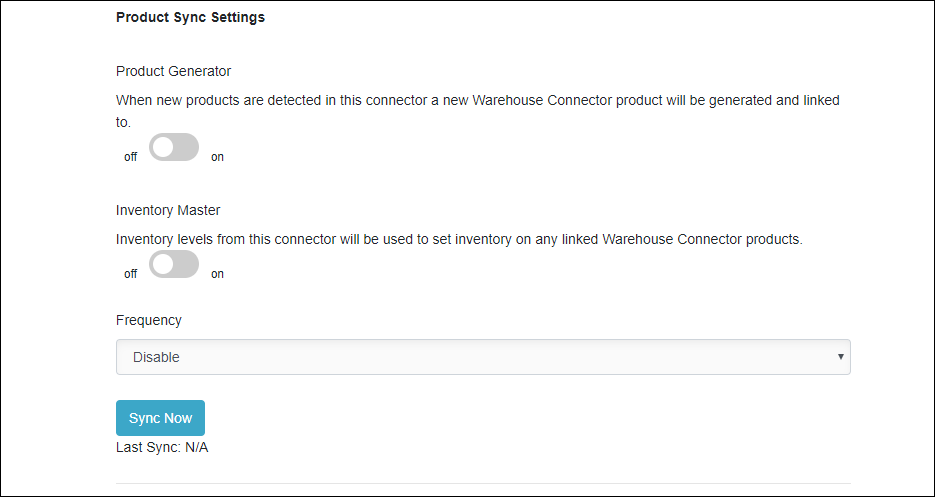
    Product Sync Settings

  2. Enter the following details:

Field Description
Product Generator Use this toggle to enable or disable the product generator feature. If this is enabled, then when a new product is detected in this connector, a new Warehouse Connector product is generated and linked to that product.
Inventory Master Use this toggle to enable or disable the inventory master feature. If this is enabled, then inventory levels from this connector are used to set inventory on any linked Warehouse Connector products.
Frequency Select the frequency at which you want to sync the product data between Warehouse Connector and Shopify.
  1. Click Sync Now to sync the product data immediately.
  2. Click Save when you have finished configuration for all of the order sync settings.

← How do I sync order data with the Shopify store? How do I sync inventory, customer, and fulfillment data with the Shopify store? →

Didn’t find what you are looking for?
Tell us about your project Learn how you can keep your business competitive in an app-connected world. File a support ticket File a support ticket for critical issues that require a higher level of support.
Warehouse Connector © 2020