
Warehouse Connector Help Return to Warehouse Connector App
GitHub
  • Warehouse Connector Overview
  • Manage Sales Orders
  • Manage Purchase Order
  • Manage Products
  • Manage Customers
  • Configure General Settings
  • Shopify Store Integration
  • Amazon Store Integration
  • NetSuite Integration
    • How to get the access credentials in NetSuite?
    • How do I connect my NetSuite store?
    • How do I sync order data with the NetSuite store?
    • How do I sync product data with the NetSuite store?
    • How do I sync purchase data with the NetSuite store?
    • How do I sync inventory, customer, and fulfillment data with the NetSuite store?
    • How do I perform custom field mapping with the NetSuite store?
    • How do I perform warehouse mapping with the NetSuite store?
    • How do I perform product mapping with the NetSuite store?
  • MasonHub Integration
  • GLO/NAV Integration
  • Impress Integration

# How do I perform warehouse mapping with the NetSuite store?

Once your NetSuite store is successfully connected, Warehouse Connector allows you to map NetSuite inventory locations to their Warehouse Connector equivalent. This allows the automatic mapping of imported NetSuite's products. To be able to create mappings, Warehouse Connector products should be imported, and inventory locations should be configured in NetSuite.

To map the warehouse with your NetSuite store:

  1. Click on the Settings icon and click Edit on the menu to provide Warehouse Mapping details.

    Scroll down to the Warehouse Mapping section.
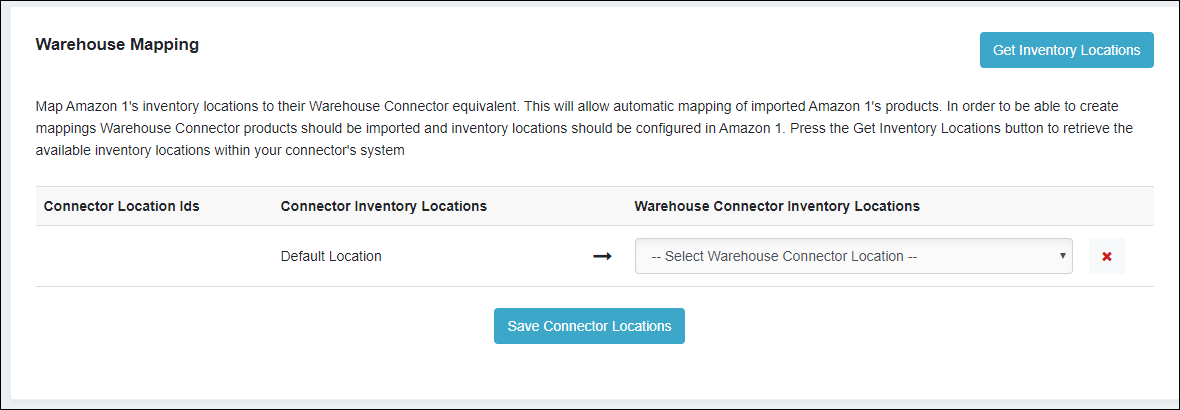
    Warehouse Mapping

  2. Click the Get Inventory Locations button to retrieve the available inventory locations within your NetSuite store.

  3. Select the location from the Warehouse Connector Inventory Locations list.

  4. Click Save Connector Locations when you have finished.

← How do I perform custom field mapping with the NetSuite store? How do I perform product mapping with the NetSuite store? →

Didn’t find what you are looking for?
Tell us about your project Learn how you can keep your business competitive in an app-connected world. File a support ticket File a support ticket for critical issues that require a higher level of support.
Warehouse Connector © 2020